Configuration Options
Configure wiping methods, device health thresholds, export columns, and the StockWise integration.
The Configuration section lets administrators define system behavior, customize sanitization workflows, and control reporting outputs — aligning Clear with internal policies, compliance standards, and operational requirements.
Wiping Methods Configuration
Defines the technical parameters Clear uses to sanitize data — select methods based on device type, security requirements, and compliance standards.
Locked devices must be unlocked through Per Device Configuration before applying wipe methods that require device access.
Under Wiping Method Group, select a method group:
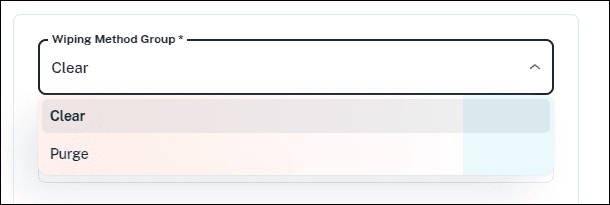
Pattern-based overwrite methods that write predefined values (zeros, ones, or random values) across storage media. Commonly used when preparing devices for reuse or decommissioning.
Hardware/firmware-based commands. Faster and more effective for SSDs, including access to hidden storage areas. Includes cryptographic erase and enhanced firmware operations for stronger assurance.
Under Wiping Method, select the appropriate option (available options depend on the group selected):
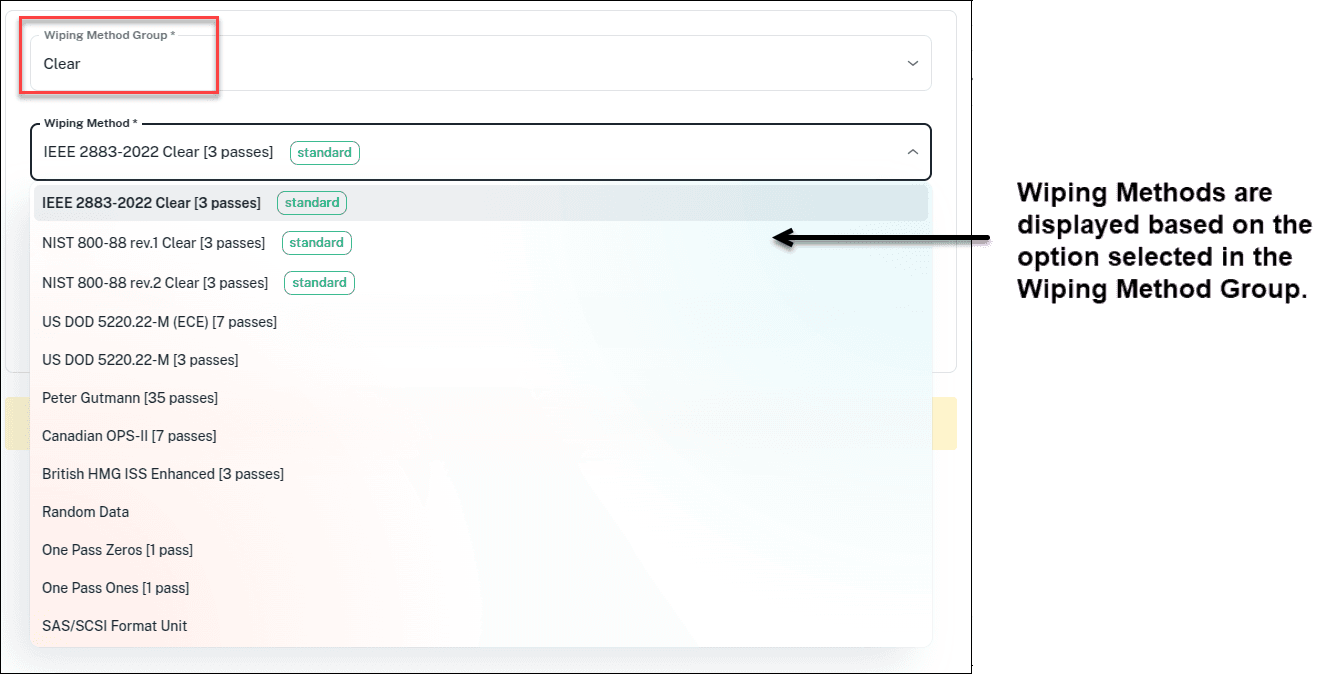
- IEEE 2883-2022 Clear (3 passes)
- NIST 800-88 rev.1 Clear (3 passes)
- NIST 800-88 rev.2 Clear (3 passes)
- US DOD 5220.22-M (ECE) (7 passes)
- US DOD 5220.22-M (3 passes)
- Peter Gutmann (35 passes)
- Canadian OPS-II (7 passes)
- British HMG ISS Enhanced (3 passes)
- Random Data (1 pass)
- One Pass Zeros (1 pass)
- One Pass Ones (1 pass)
- SAS/SCSI Format Unit (SAS drives only)
- IEEE 2883-2022 Purge
- NIST 800-88 rev.1 Purge
- NIST 800-88 rev.2 Purge
- Auto Purge (tries firmware erase commands in priority order)
- Sanitize Erase (SATA, SAS, NVMe)
- Sanitize Overwrite (SATA, SAS, NVMe)
- Crypto Scramble
- Secure Erase (SATA only)
- Secure Enhanced Erase (SATA only)
- Format NVM / User Data Erase (NVMe only)
If the selected command isn't supported by the drive, Clear automatically falls back to the selected fallback method.
Select a PRNG Method — the random number generator used for wipe methods requiring random data. Disabled when random data isn't used. Default: TWISTER (Mersenne Twister).
Enter the Verification Percentage — the percentage of data verified after the final pass. Higher values give greater assurance but take longer.
IEEE minimum is 5%, NIST recommends 10%. Allowed range: 5%–100%.
Select a Fallback Method — a secondary, software-based method used if the primary hardware-based command fails (available only for firmware-based groups like Sanitize and IEEE 2883-2022 Purge). Options include NIST 800-88, IEEE Clear, US DOD 5220.22-M variants, Peter Gutmann, Canadian OPS-II, British HMG ISS Enhanced, Random, One Pass Zeros, and One Pass Ones.
Device Health Configuration
Lets administrators define how Clear evaluates and classifies device health, helping identify unreliable or failing devices before or during sanitization.
Select the Health tab.
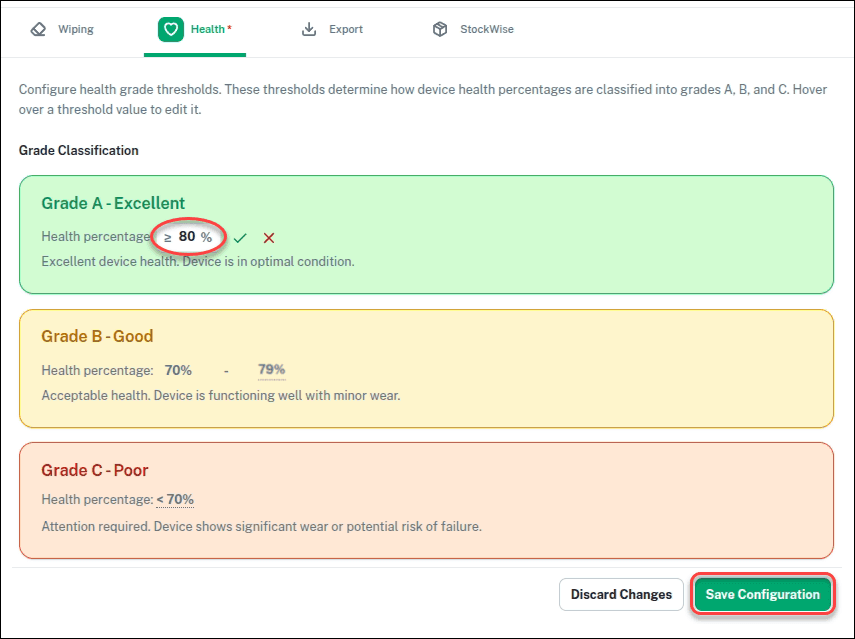
Clear classifies devices into three health grades:
- Grade A – Excellent: optimal condition, no significant issues. Health percentage ≥ 80%.
- Grade B – Good: acceptable condition with minor wear (e.g., 70%–79%).
- Grade C – Poor: significant wear or potential risk of failure (e.g., ≤ 70%).
Export Configuration
Defines which data fields are included when exporting job information — this controls the columns in CSV reports generated from the Jobs screen.
Select the Export tab.
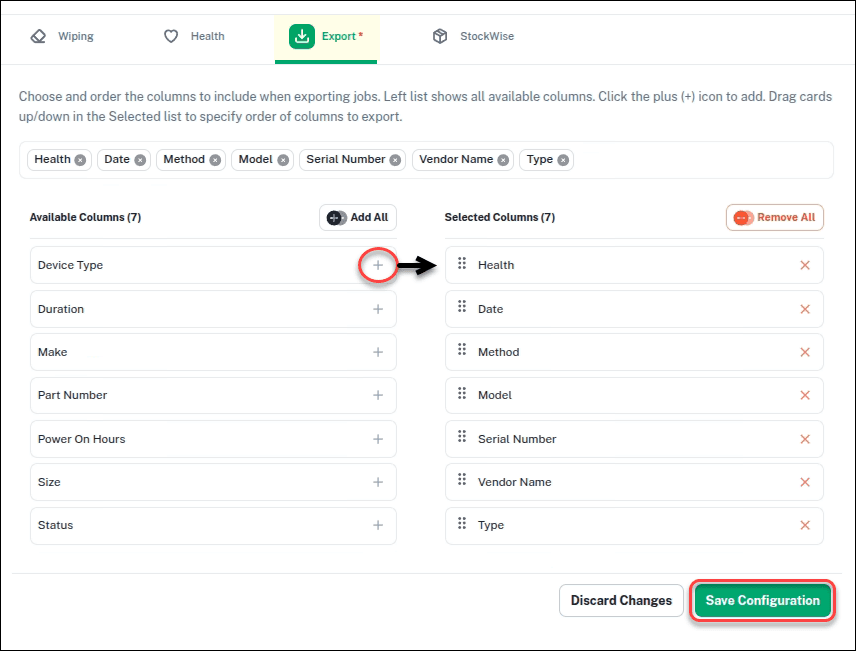
Two panels manage export columns:
- Available Columns — all fields that can be included.
- Selected Columns — fields that will be included in the export.
Export to StockWise
Enables integration between Clear and StockWise for automatic device data transfer, inventory management, and asset tracking.
Select the StockWise tab.
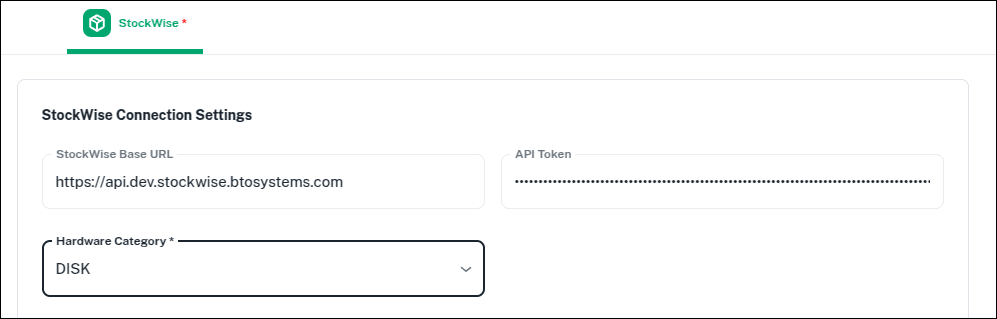
Under StockWise Connection Settings, specify:
- StockWise Base URL — the web address of your StockWise API endpoint.
- API Token — the authentication key authorizing communication between Clear and StockWise.
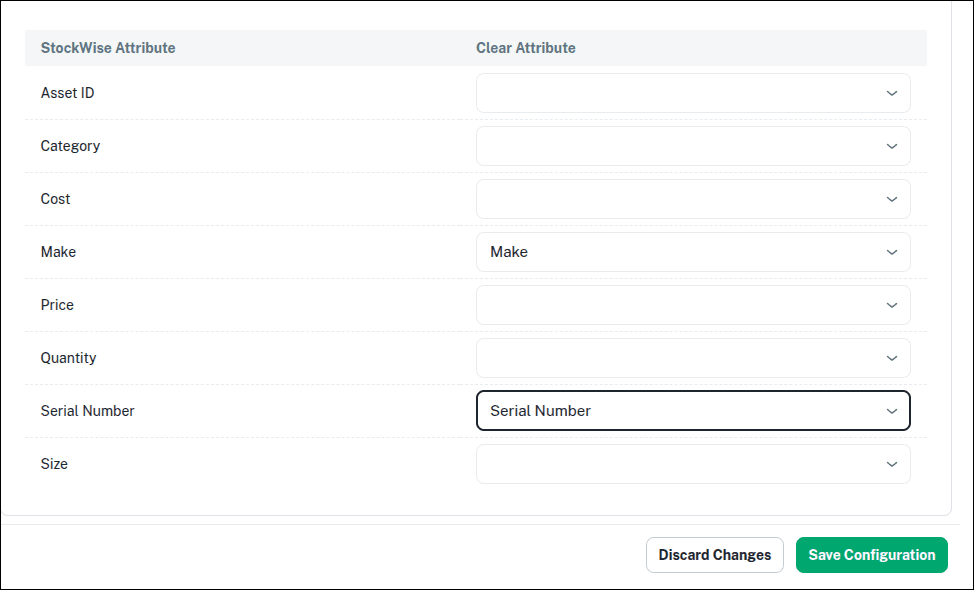
Map attributes between Clear and StockWise — review each StockWise field in the left column and select the corresponding Clear attribute.