Label Printer
Review and edit the label printer connection, or disconnect it.
The Label Printer page holds the connection the portal uses to print labels.
Reviewing the connection
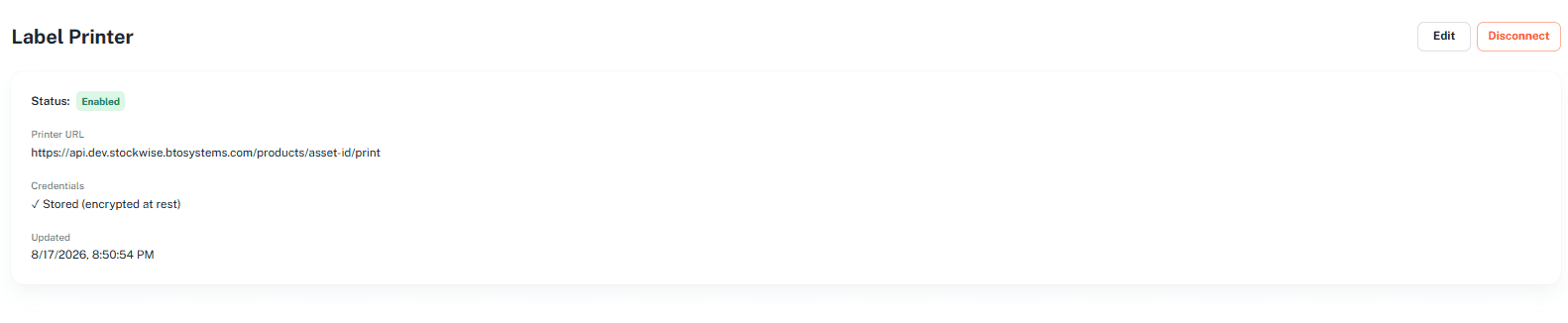
Click Label Printer under Configuration in the portal menu. The page shows:
- Status — for example, Enabled.
- Printer URL — the endpoint labels are sent to.
- Credentials — whether a token is stored. Stored credentials are encrypted at rest.
- Updated — when the connection was last changed.
Editing the label printer
Click Edit (top right). The Edit label printer dialog opens.
Enter the Printer URL — the endpoint the portal POSTs { serial } to.
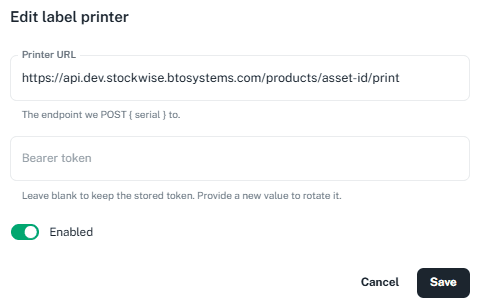
Bearer token — leave blank to keep the stored token, or enter a new value to replace it.
Use the Enabled switch to turn label printing on or off.
Click Save.
Disconnecting the label printer
Click Disconnect (top right) to remove the label printer connection.
Next: Export Columns